
Where we were a year ago
A year ago, the Camel Core CI on Jenkins was producing between one and four fully green builds per year, i.e. in success for the whole test matrix at the same time. The build was taking almost 6 hours when things were going fine.
The number of flaky tests was very important causing committers to stop really looking to failures and just awaiting following build results hoping for a flaky test. And when it wasn’t, it means searching through a larger set of commits given that for resource constraints we didn’t keep the whole build history.
At the same time, the workload kept growing:
- more backports to the LTS branches
| Year | Backport PRs merged | Per branch |
|---|---|---|
| 2024 | 160 | 4.4.x: 58, 4.8.x: 57, 4.0.x: 18, 3.22.x: 14, 3.21.x: 7, 3.x: 5, 4.3.x: 1 |
| 2025 | 164 | 4.10.x: 82, 4.14.x: 48, 4.8.x: 30, 4.4.x: 2, 4.16.x: 1, 3.22.x: 1 |
| 2026 (to 23 Oct) | 820 | 4.18.x: 415, 4.22.x: 259, 4.14.x: 141, 4.10.x: 3, 4.17.x: 1, 3.22.x: 1 |
- more pull requests and more changes in general, several of them with reviews mostly automated
| Year | PRs merged on main |
|---|---|
| 2024 | 3,610 |
| 2025 | 3,326 |
| 2026 (to 23 Oct) | 6,097 |
On top of that, we started hitting the GitHub Actions limits, which are shared among the whole Apache GitHub organization. The queue time can go up to dozens of hours on worst days, regularly dozens of minutes. On a 30 minutes job that’s quite consequent and slowing down the development process.
It was time to give a bit more love to our CIs. The focus was first on Jenkins, but several actions benefitted to both of them. This is an on-going work but let’s share some of the improvements results today as we reached an important milestone last week on Jenkins CI.
High-level figures: before and after
Let’s start with a high-level comparison of the improvements
| Metric | A year ago | Today |
|---|---|---|
| Green Jenkins builds on main | 1 to 4 per year | several per days |
| Duration of the Jenkins build for main | 5h45 | 1h24 |
| Duration of the Jenkins build for 3 streams in parallel | between 15h and 24h | 6h (*with one manual workaround so far) |
| Theoretical duration of the Jenkins build for 3 streams in parallel when oldest maintenance stream will be 4.24 | between 15h and 24h | 1h24 |
| Duration of a small PR build (GitHub Actions) | 35 minutes | 20 minutes |
How we improved stability
Categories of issues
Most of the stability improvements were related to these categories:
- Port conflicts for services used for testing.
- Shared system collision: beware of clearing all contents in tear downs, ensure that different names/paths are used.
- Camel URI collision: either route ids or endpoints were colliding.
Thread.sleepusage- Lack of synchronization between expected state of the system and next steps in the test
Some generic solutions:
- Use of @Isolated, this is often the easy solution, at the cost of performance.
- Increase timeout. Beware, it is often the first solution that AI agents provide, it is not that often working. Need to check first if the test is close to the timeout when passing, otherwise it is usually another problem and it will only increase the time before the test is failing.
- Use more conditional checks with
Awaitilityto ensure that systems are ready, or what we want to test is in the expected state
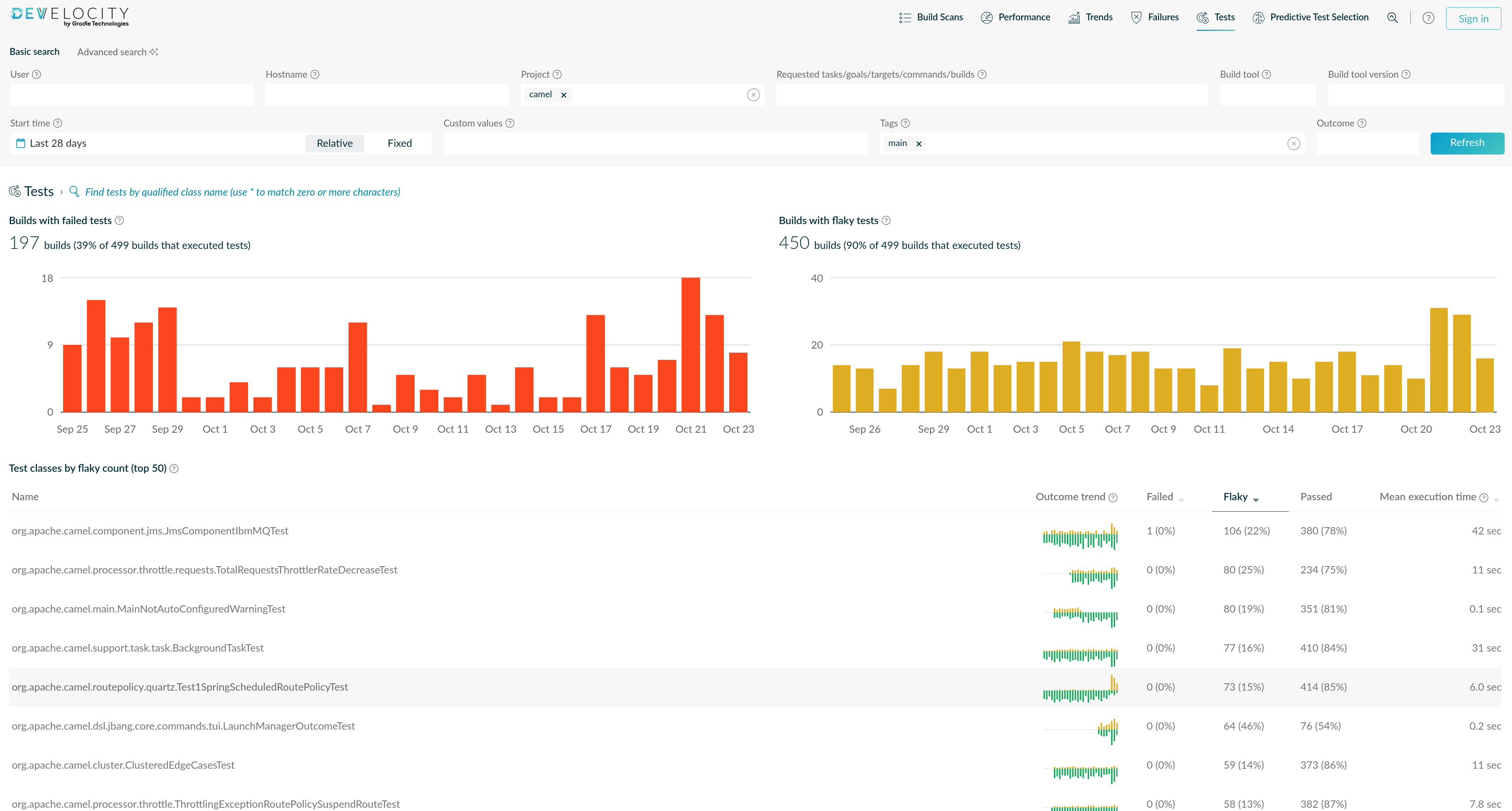
Develocity to identify flaky tests
The Apache foundation has a Develocity instance available. To identify flaky tests, there is a very convenient dashboard here.
Automatic rerun of failing tests
A lot of the flakiness is workarounded by rerunning the test immediately in the same build. It slows down the build and can hide few real issues, but overall it really helped to move forward. For instance, the Jenkins build runs Maven with -Dsurefire.rerunFailingTestsCount=2 -Dfailsafe.rerunFailingTestsCount=1.
The reruns with at least one success are reported as success. We can monitor the flaky tests in Develocity.
Cleaning the Jenkins Nodes
Leftovers from previous builds on the Jenkins agents were another source of unreliable results. Several failures were due to out of disk space or very slow system when writing on disk. There were thresholds to limit these behaviors, it meant that fewer Jenkins runners were available when the limit was hit until someone noticed it and cleaned the Jenkins node. We cleared hundreds of Gigabytes on most of the Jenkins nodes. Cleared Docker image and volume cache, .m2 snapshots and old Workspaces which were failed to be removed.
We now:
- clean the workspace before each build (
cleanWs()), and remove the previously installedorg/apache/camelartifacts from the local Maven repository so a build never picks up stale snapshots, - clean the workspace after the build when it succeeds, we keep it in case of failure for 5 builds to let time to investigate
- limit the history of kept builds and artifacts (
buildDiscarderlog rotation) so that old workspaces and artifacts do not accumulate on the agents.
How we reduced the build time
Parallel builds with -T1C
The first step was to use the Maven -T1C option (one thread per CPU core). A first iteration was targeting mostly the compilation and deployment part as this part was working almost out of the box. A second iteration focused to the tests part. This one was trickier, several tests (and also some runtime code) were not robust enough.
Improvements are more impressive on Jenkins given that we have between 8 and 24 CPUs available, compared to the 4 on GitHub actions.
Let’s see the nice results:
For deployment on Jenkins:
| Project | Without -T1C (before) | With -T1C |
|---|---|---|
| Camel Core | 2h35 | 25min |
| Camel Spring Boot | 1h20 | 15min |
| Camel Quarkus | 3h | 17min |
For Camel Core build and test on Jenkins:
| Jenkins node | Without -T1C (before) | With -T1C |
|---|---|---|
| ppc64le | 5h 45min | 1h 41min |
| s390x | 2h 24min | 48min |
| x86_64 with Sonar | 5h 20min | 1h 47min |
| x86_64 without Sonar | 4h 09min | 56min |
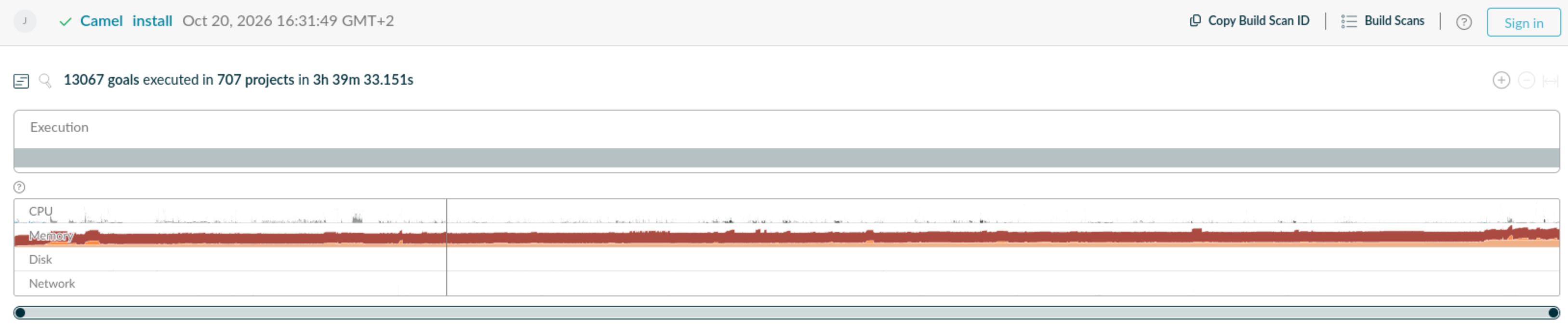
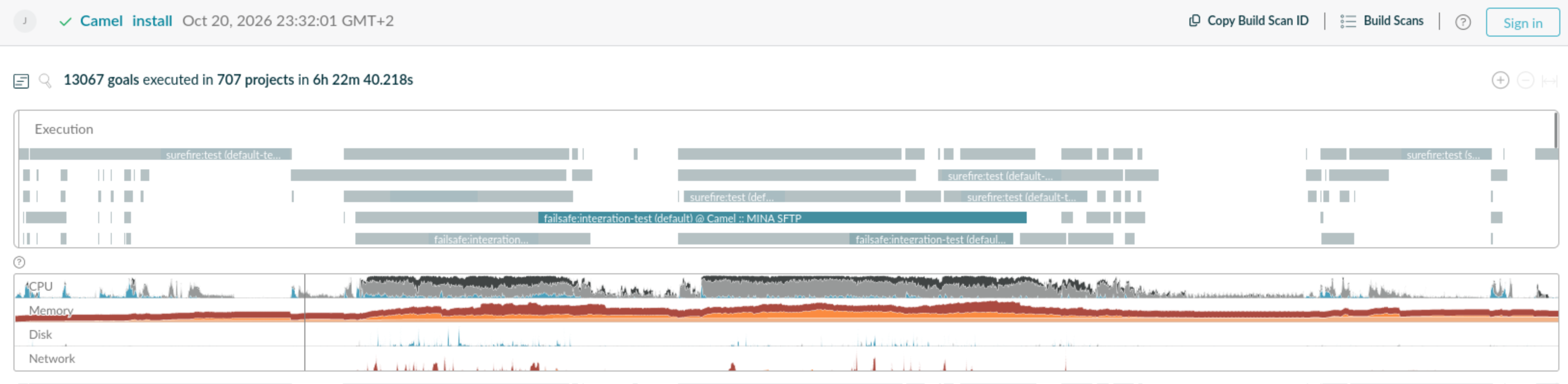
We can notice a better leverage of the CPUs:
before:
after:
For regeneration script (etc/scripts/regen.sh) check step:
| Environment | Without -T1C (before) | With -T1C |
|---|---|---|
| GitHub Actions | 15min30sec | 9min |
| Local with 22 Cores | 4min45s | 1min10s |
Note: Maven Daemon (
mvnd) also provides multi-core Maven builds and could improve log readability. We discarded it as an initial step to avoid the maintenance cost of an additional dependency, and because the current logs are readable enough.
Stricter constraints on stability
Running in parallel with -T1C raised the bar on the previous stability points. Tests that used to be merely “flaky” (i.e. which were flaky but finally passing on CI thanks to the rerun parameters) tended to fail regularly once run in parallel, which forced us to fix them instead of tolerating them.
Reducing the test matrix
The Jenkins build runs a matrix of JDK versions and platforms, and each cell costs a full build and test run on a limited number of agents. As a first iteration, we reduced it by removing JDK 21 from the maintenance streams: they are already built with JDK 17 and JDK 25, and JDK 21 is still built by Jenkins on the main branch. The same reduction was applied to the GitHub Actions workflows, where JDK 21 was removed too:
- the pull request build (
pr-build-main.yml) was then running with JDK 17 and 25, - the build of the
mainbranch (main-build.yml) was then running with JDK 25 only.
Fewer builds in the matrix means less load on the agents and on the GitHub Actions quota shared with the other Apache projects, and a faster overall result.
The good news is that with Camel 4.24 upcoming, JDK 17 has been dropped. It means one less JDK to test!
We also make JDK25 to be on-demand for Pull Requests on GitHub Actions Workflows to reduce load even further. Given that we now have a much faster feedback for JDK 25 coming from Jenkins after parallelization activation, we considered it as an acceptable tradeoff for now.
Scope modules to be tested on each PR
There is a mechanism in place to build and compile only modules which depend on the modified code on each PR. It allows to reduce the amount of tests required to be launched. This is something which has already been in place for several years but it benefitted from several improvements these years to be more accurate.
Avoiding full git clones
Cloning the whole history on every build is wasted time and bandwidth. Especially for a repository the size (and age) of Camel. For instance on GitHub actions, it was taking 5 minutes! Compared to the 17 seconds using a clone with limited depth and for only the specific branch, that is an easy improvement. The Jenkins build now uses a shallow clone (depth 1, without tags) for every cell of the matrix. The single exception is JDK 21 on the ubuntu-avx agent: it needs the full history for the Sonar analysis with history to report date of introduced issue.
GitHub Actions: ubuntu-slim, cancellation policy and push branches
Cancellation policy. The pull request build uses a concurrency group per pull request with cancel-in-progress: true: when new commits are pushed, the build that is still running for the previous ones is cancelled instead of wasting runners. The build of the main branch has cancel-in-progress: false, so every commit on main is built and gives a result that can be matched to a commit. Here is a little script to scan a repository or an organization which is missing this config.
ubuntu-slim runners. The short workflows (less than 15 minutes) run on the lighter ubuntu-slim runners instead of ubuntu-latest, see this commit. The full Maven builds (pr-build-main.yml and main-build.yml) stay on ubuntu-latest, as they need the resources of a standard runner. It allows to be on another queue for the build and it is reducing the time to switch between one job to another.
push branch configuration. It is important to ensure that the configuration of which branches get a build on push is specifying the branches. It avoids to build two times the same commit for branches created on the same repo and pushed as PR. Note that Dependabot PRs are falling in this category by default. I tried to provide this improvement to all the active projects for which it was missing. Here is a little script to scan a repository or an organization which is missing this config.
Fix Jenkins leased node bug
To avoid too much clash between Camel builds, we forbid to play them on same nodes at the same time. Due to a Jenkins bug, ppc64le and s390x nodes are not asked to be started. It is causing our jobs on these architectures to be played in serial. It can take up to 24 hours to finish all the jobs. This is currently the biggest bottleneck when I do not trigger the manual workaround. A Pull Request is available jenkins#27365 and awaiting to be reviewed. If you have knowledge or connection with Jenkins team, please help to improve this point. A workaround consists in triggering dummy jobs to fill the executor queue of the Jenkins node so that the other nodes are starting and be picked up.
Develocity to spot critical path in Maven build
Develocity is also providing build scans with interesting information on the timeline and the resources used. It allowed to spot several candidates for improvements in the critical path of the Maven build. It helped to direct investigation on the next 2 improvements described.
Compilation of generic Map.entries
This one is a bit technical but it was one of the most unexpected that I found. The compilation of one relatively small module - camel-util - was taking several dozens of seconds, even several minutes on ppc64le. I spotted that it was part of the critical path so decided to take a look. It was due to a single class and 400 lines of a static Map initialization. The problem was that it was relying on genericity and the compiler seems to have a non-linear algorithm to infer every nested generic Map.entry call together with the outer call. By just specifying the witness, it went back to a second!
Before:
private static final Map<String, String> COMPONENTS = Map.ofEntries(
            Map.entry("a2a", "camel-a2a"),
            [...]
);
After:
private static final Map<String, String> COMPONENTS = Map.ofEntries(
            Map.<String, String> entry("a2a", "camel-a2a"),
            [...]
);| Jenkins node | default-compile before | default-compile after | Gain (default-compile + recompile) |
|---|---|---|---|
| Ubuntu x86_64 | 36s | 1s | 1m10s |
| ppc64le | 3m56s | 1.7s | 7m48s |
| s390x | 41s | 0.8s | 1m20s |
See CAMEL-25963 for more details.
Activating JUnit test parallelization
Not all modules have JUnit test parallelization activated. For the ones on the critical paths and not running during too many other modules, it is interesting to activate it to benefit from all CPUs available.
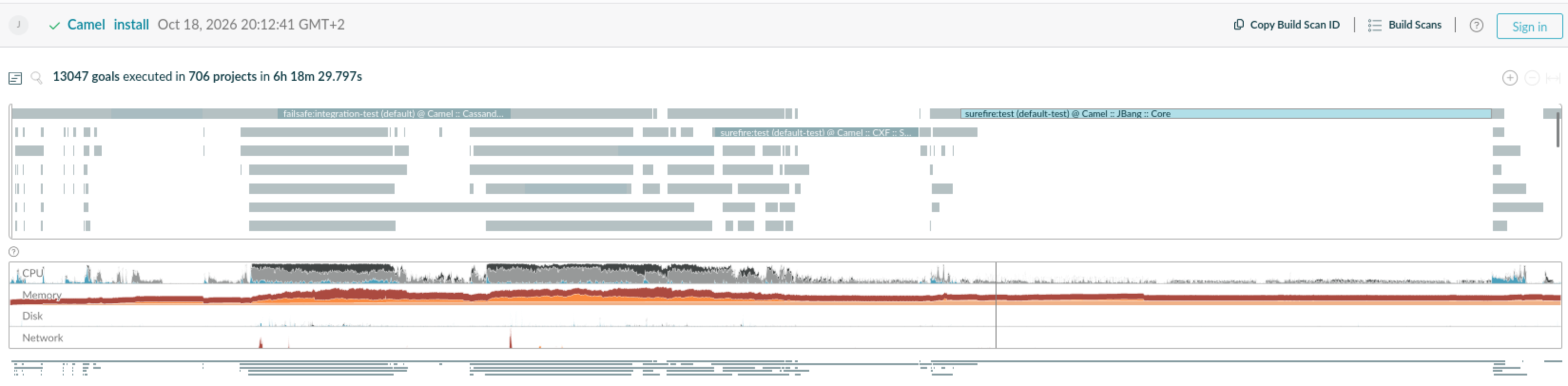
For instance, for camel-jbang-core, we noticed that it was running alone here and the tests are taking 18 minutes:
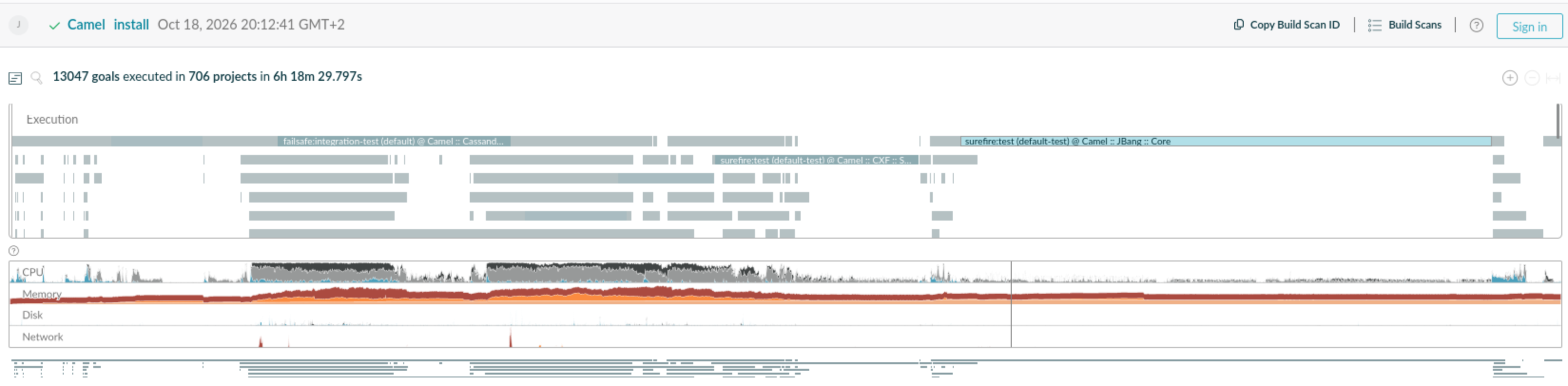
By activating JUnit parallelization with this commit and caching catalog, we gained 15 minutes!
What’s next
- (Re)activate test parallelization for some modules where it was disabled, for instance
mina-sftp. Can be both from Maven JUnit config or with@Isolatedor even@OrderJUnit annotations. - Tweak test parallelizations with best number of threads
- Investigate/improve Sonar which is not leveraging parallelization or multi-core CPUs at all. Currently adding 30 minutes on our 1h25 build with Sonar.
- Investigate build and test time of modules on critical paths
- Investigate other Camel projects
- Apply new recommendation policies for GitHub Workflows which are emerging in Apache community, for instance from discussions in Slack channel #project-workflow-optimizations
Thanks
I would like to thank:
- Apache Camel committers which supported my recurring rant of not green CI for quite some time.
- Apache Infra team for the Jenkins clean
- Apache committers and Apache Infra team who helped to investigate and propose ideas to improve the state on GitHub shared pool of runners